-1.png?width=1920&height=970&name=Juno%20Tax%20Prep%20Advisory%20Review%20(1)-1.png)
Extraction of State Data from Source Documents
Juno extracts state and local fields that appear on supported source documents. Common examples include:
- W-2 Boxes 15–20
- State withholding and payer state information on Forms 1099-NEC, 1099-MISC, 1099-R, 1099-G, 1099-INT, and 1099-DIV
- State information included on supported K-1s
Depending on the form and field, state information may appear differently on the Juno validation screens.
State-specific fields
For fields that are specific to a state or locality, Juno displays a separate State and Local Information section.
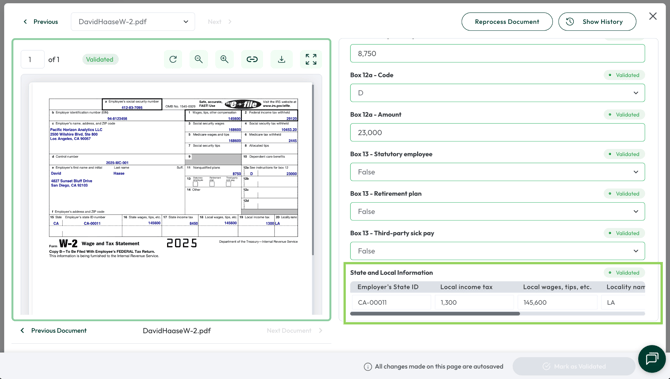
Federal fields with a state breakdown
For fields that contain both federal and state amounts, select Show State Breakdown to expand the field and review the associated state information.
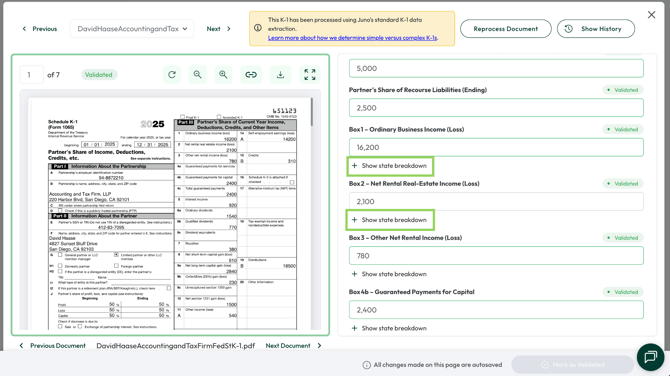
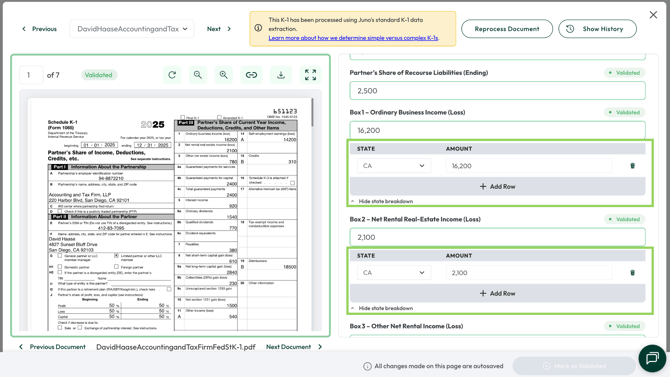
Regardless of where the state information appears, you can review and edit the extracted values if needed before exporting the return to your tax software.
For a complete list of documents Juno currently supports, see Supported Source Documents.
Export of State Data to Tax Software
During an export, Juno enters supported state data along with the federal data extracted from the source documents.
In most cases, this information is entered into the corresponding federal input screen in your tax software, such as:
- W-2 input worksheets
- 1099 input screens
- K-1 input screens
Where supported by the tax software, Juno also enters the applicable state identifier, state amount, withholding, or source information.
From there, your tax software uses those inputs to calculate and build the applicable state return, just as it would if the information had been entered manually.
Important Note: Juno enters source-document data into the fields available within your tax software. How that information flows to a state return, and how the state return is ultimately calculated, is determined by the tax software.
What Juno Does Not Do
Juno does not currently:
- Add or activate a state return
- Determine or set resident, part-year resident, or nonresident filing status or residency dates
- Allocate a single federal amount between multiple states beyond the state allocation listed on the supported source documents uploaded to Juno
- Apportion business income between states
- Enter state-specific adjustments, credits, or deductions, including credits for taxes paid to another state
- Enter local or city return information beyond supported source-document fields
When Juno identifies information that requires additional review or cannot be entered into the applicable tax software field, it will be surfaced for the preparer to review, including through the Preparation Checklist after export where applicable.
What Should I Review?
Juno handles the source-document data entry, but the preparer should still review the resulting state returns in the tax software.
In particular, confirm any items that depend on facts outside of the source documents, such as:
- Residency and filing requirements
- Multi-state allocations
- Business apportionment
- State-specific adjustments and credits
- Estimated tax payments
- Local or city filing requirements
This helps ensure the state return reflects the taxpayer's complete filing situation, not just the information reported on the source documents.
Questions? Contact our Customer Support team at support@juno.tax or use the live chat in the bottom-right corner of the Juno web app.