
What is a workpaper?
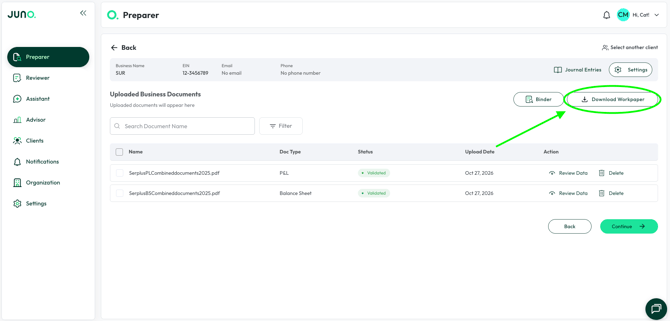
A Workpaper is a workbook that shows the data Juno pulled from your client's documents, organized so you can check it against the draft return. Download it from Preparer with the Download Workpaper button.
- What it's for: tracing any number on the return back to its source, and reviewing the draft line by line before you sign off.
- Where the data comes from: your client's uploaded documents, so it always reflects the data Juno has for that return.
- Where it's available: individual (1040) and business (1120, 1120-S, 1065) returns.
How workpapers are organized
Each form type has its own tab, such as W-2 or 1099. A tab shows the data from every form of that type uploaded, plus a totals column for the form type so you can reconcile it.
Summary tabs organize that data the way it flows onto the return. Groupings and line numbers match the lines on the 1040 or business return, so you can compare the Workpaper to the draft return side by side without translating between layouts.
Supported Excel versions
Open Workpapers in Microsoft 365 or Excel 2024. Workpapers use modern Excel functions (such as LET, LAMBDA and MAP) that older versions don't have.
|
Excel version |
Supported? |
|---|---|
|
Microsoft 365 (Windows, Mac, web), current builds |
Yes |
|
Excel 2024 |
Yes |
If you can't use a supported version, the fastest fix is to open the file in Excel on the web with a Microsoft account.
Need help?
If you have any questions about Juno workpapers, reach out via live chat in the Juno Web App or email support@juno.tax.