-1.png?width=1920&height=970&name=Juno%20Tax%20Prep%20Advisory%20Review%20(1)-1.png)
Juno includes the option to add a Taxpayer (TP) or Spouse (SP) designation to source document names, along with the issuer’s EIN or account number.
This naming convention is designed to make form identification clearer, especially in returns where there are more than one document from the same issuer (for example, two W-2s from the same employer). By including the TP/SP and number, you can quickly distinguish the forms without needing to open each document.
Without these identifiers, existing forms in your tax software from the same issuer can appear identical during the scan. In those cases, additional manual review may be required to confirm you’ve selected the correct form, which can slow down the export workflow.
Important Note: This is an Optional Setting
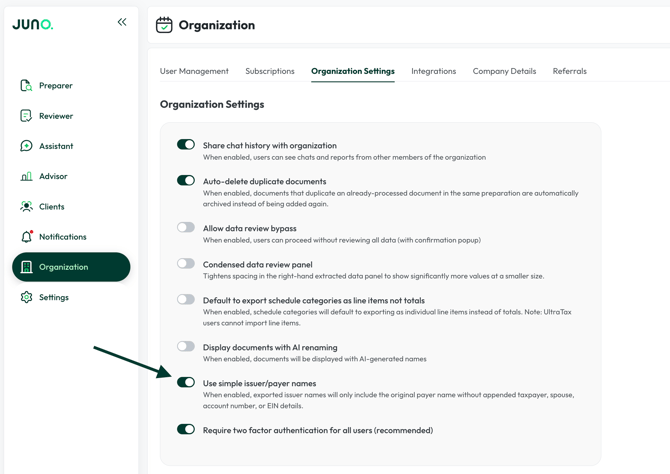
If you prefer not to have this added to issuer names for documents in your tax software, an Org Admin can switch your organization to a simplified naming format at any time.
To update this setting:
- Open Organization Settings
- Toggle Use Simple Issuer/Payer Names on
- Scroll down and click Save
If you have additional questions on this feature, please contact Customer Support via support@juno.tax or in live chat inside of the Juno Web App.