
The Juno and Firm 360 integration streamlines tax preparation by connecting your Firm 360 clients and documents directly to Juno. Once connected, your team can push documents from Firm 360 to Juno and track processing in real time.
Important note before you begin: You'll need Admin access in Firm 360 to complete these steps. If you're not an Admin, ask a team member with Admin access to integrations to complete the setup.
Step 1: Navigate to Integrations Page
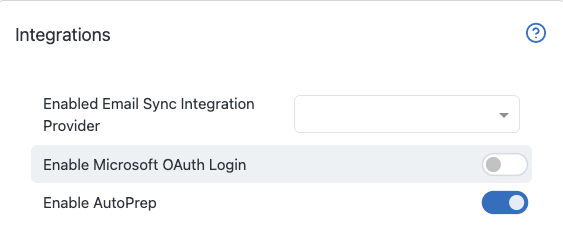
In your Firm 360 account, go to “Settings” in the Admin section of your navigation panel and scroll down to Integrations.
Toggle Enable AutoPrep on, then click Save
Step 2: Open the AutoPrep Integration
After saving, go to Integrations in the Admin section of your navigation panel and find the AutoPrep Integration section.



Step 3: Click Connect to Juno
If your firm already has a Juno Account:
Click Connect to Juno and you’ll be prompted to log in to your Juno account (if you're already logged in, you'll skip straight to the authorization screen.) Click Authorize & Continue to establish the connection.

If your firm doesn't have a Juno Account:
You can try the Juno and Firm 360 integration as part of Juno's free trial. Click Connect to Juno and select how you'd like to create your account. 
Once you've completed the Juno sign-up flow, click Authorize & Continue to establish the connection

Want to learn more about Juno’s free trial? Check out our article Juno Free Trial FAQs
Step 4: Start Sending Documents
Once the connection is established, you'll see a success message like the one below.

You're all set! For next steps, see our article Sending Documents from Firm 360 to Juno.
Questions
If any other questions on connecting to Firm360 come up, please contact Customer Support via live chat inside of the Juno Web App or email us at support@juno.tax. We're happy to help!