-1.png?width=1920&height=970&name=Juno%20Tax%20Prep%20Advisory%20Review%20(1)-1.png)
Important Note for Free Trial Users:
Prior to connecting your ProSeries instance to Juno, you'll need to complete your free trial period. Once your customer onboarding begins, a member of our team will:
- Share the Juno Integration app download link with you
- Guide you step-by-step through connecting your tax software live during your onboarding call (we highly recommend downloading the app in advance, but waiting for your onboarding call to set up the integration)
- Ensure you’re fully set up and ready to start using Juno
Important Note If You Host Proseries Using a Remote Desktop
If your ProSeries instance is hosted via a remote desktop (ie Rightworks or Verito), you will need to ensure the Juno Integration app is installed in your hosted desktop before you proceed with the following steps.
One-time setup: Juno custom views
Do this once per ProSeries workstation, before syncing any clients. Juno uses these HomeBase custom views to sync clients and entities, and to detect when a return has been exported.
Step 1: Open Homebase in ProSeries
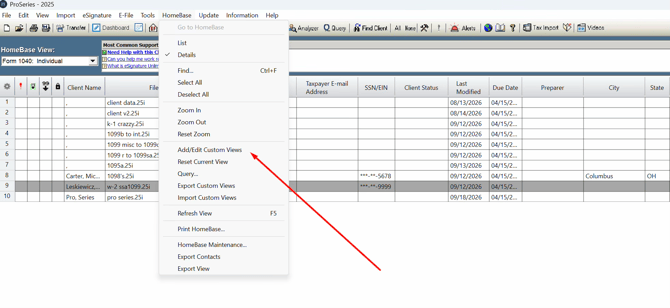
Step 2: Select “Resync Clients” in the Juno Integration App
In the Juno Integration App select “Resync Clients”
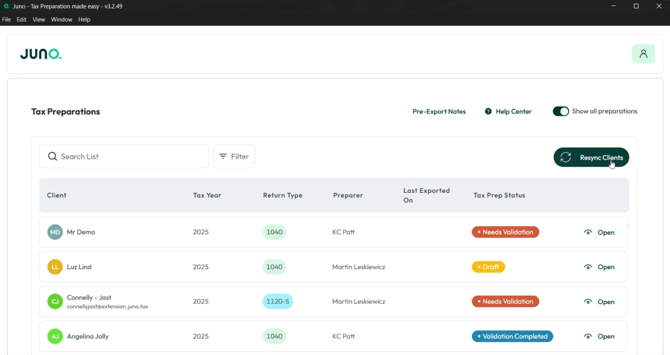
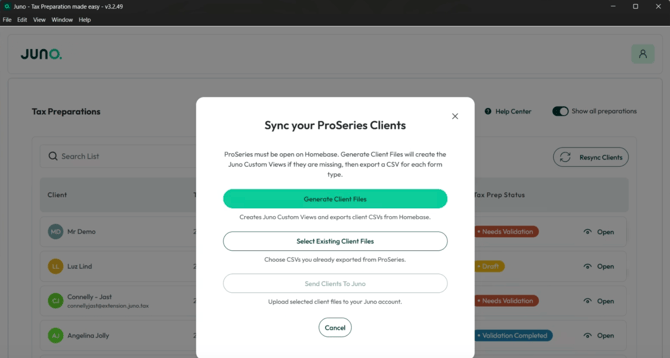
After clicking “Resync Clients” you’ll be prompted to “Generate Client Files.” After clicking “Generate Client Files” Juno will create the custom views needed to start exporting preparation data into ProSeries.
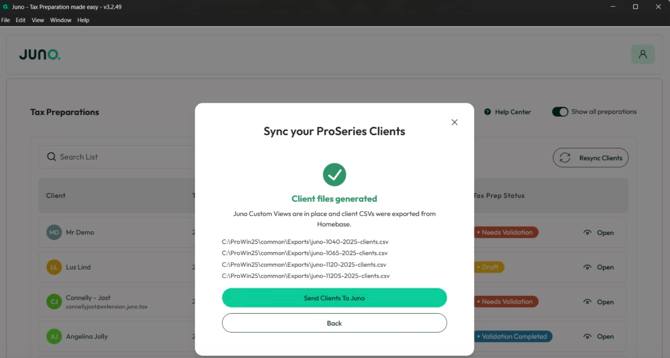
Once Juno finishes creating the Custom Views for you’ll be prompted to “Send Clients to Juno.” This creates your client list from ProSeries directly in Juno making it easy to start a tax preparation without having to create a new client each time.
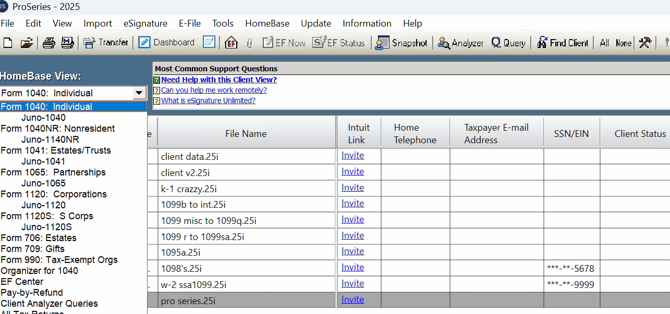
Step 3: See the Juno created Views in Homebase
Open the HomeBase View dropdown to one of the Juno views. The client grid should now show the Juno columns. This confirms the views saved correctly.
Want a step-by-step guide on exporting to ProSeries?
Once your views are set up and your clients have synced, check out our step-by-step guide to Exporting Tax Preparations to ProSeries for individual returns, or Exporting Business Returns from Juno to ProSeries for partnership and corporate returns.
Have a question?
Contact us at support@juno.tax and we'll be in touch with you shortly.